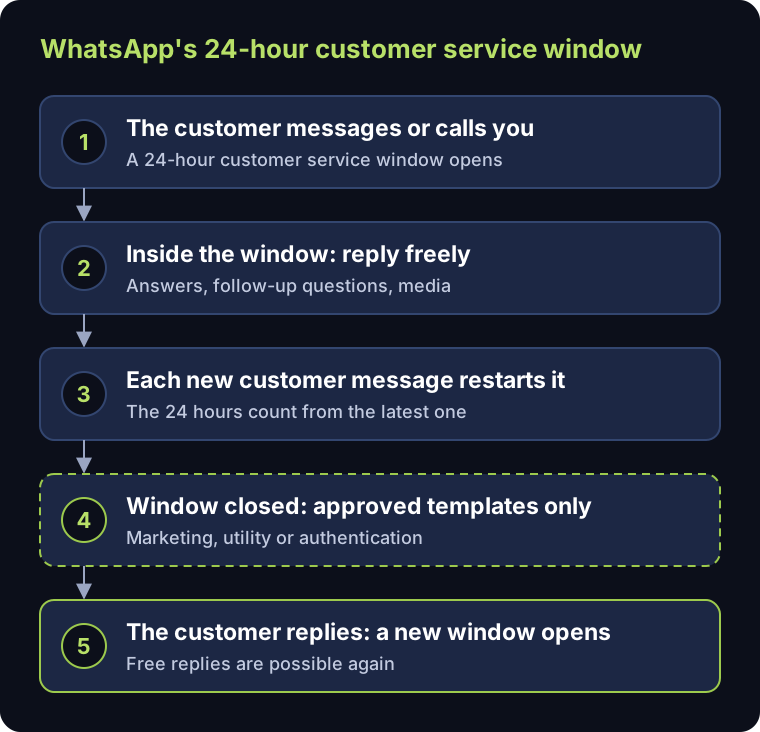
The short answer: WhatsApp lets a business reply freely for 24 hours after the customer's last message or call. After that, it can only send templates Meta has approved, each one categorised as marketing, utility or authentication. Since 1 July 2025 Meta charges per delivered message instead of per conversation, and since 1 October 2026 replies inside the window are free only for the first 1,000 a month per phone number, while utility templates are charged even inside the window.
These two rules, the window and the templates, decide how a business can follow up with a lead on WhatsApp and what it pays. Here is what each one means in practice, with Meta's own wording.
The 24-hour customer service window
Meta's documentation puts it simply: "When a WhatsApp user messages you or calls you, a 24-hour timer called a customer service window starts", and "when the window closes, you can only send pre-approved template messages" (Meta: service messages). Each new message from the customer restarts the 24 hours (Meta: pricing).
| Inside the window | After the window | |
|---|---|---|
| Free-form replies (text, media) | Yes | No |
| Approved templates | Yes | Yes, the only option |
| Who can open it | Only the customer, by messaging or calling |
The practical consequence: a lead who wrote to you at 10 in the morning can still get a normal reply at 9 the next morning, but not at 11. That is why the first reply matters, and why the answers that need a person should reach that person quickly.
Message templates
A template is a pre-written message, with placeholders for names, dates or amounts, that Meta reviews before you can use it. Meta's rules are short: "Each template must be categorized as authentication, marketing, or utility", templates "must have a status of APPROVED before they can be sent", and they are "the only type of message that can be sent to WhatsApp users outside of a customer service window" (Meta: templates).
- Utility: updates about something the customer is already dealing with, such as a booking, an order or an appointment.
- Marketing: offers, announcements and invitations to come back.
- Authentication: one-time codes that verify who someone is.
Meta's categorisation guidelines explain which category a template belongs in (Meta: template categorisation), and the category affects the price. For Saudi customers, prepare each template in Arabic and English so the follow-up arrives in the language the customer used.
An example utility template (invented, for illustration): the numbered placeholders are filled in when the message is sent.
| Language | Template text |
|---|---|
| English | Hello {{1}}, your booking {{2}} is confirmed for {{3}}. Reply here if anything changes. |
| Arabic | مرحبًا {{1}}، حجزك {{2}} مؤكد بتاريخ {{3}}. راسلنا هنا إن تغيّر أي شيء. |
What it costs, and what changed in 2025 and 2026
- Per message, not per conversation. Conversation-based pricing "was replaced with per-message pricing on July 1, 2025". Meta charges by category and market, "only for messages from businesses to users", and only when a message is delivered (Meta: pricing).
- Replies inside the window. Each business phone number has a free tier of 1,000 delivered service messages a month; from the 1,001st, Meta charges. These were free from November 2024 until Meta resumed charging on 1 October 2026 (Meta: pricing).
- Utility templates inside the window. Free from 1 July 2025, charged again since 1 October 2026 (Meta: pricing).
- Ads that open WhatsApp. For customers on Android and iOS who message you from such an ad, a free entry point window "may remain open for up to 7 days" after you reply, and Meta does not charge for messages while it is open (Meta: pricing).
Rates differ by category and country; Meta publishes them on the same pricing page, and they change, so check them before you budget rather than relying on a figure from a blog post.
Consent before you message first
The window is about replies. Messaging someone first is a separate rule: Meta says businesses "are required to obtain opt-in before messaging people on WhatsApp", and the opt-in has to name your business and make clear the person will receive messages from it (Meta: get opt-in). Collect it where the lead starts, for example on the website form or the lead ad, and stop messaging anyone who asks you to.
Planning follow-ups around the window
- 1.Answer inside the window. Most leads can be qualified while the conversation is still open, if someone (or an assistant that follows your rules) answers while the customer is still there.
- 2.Keep templates for what genuinely needs one. Booking confirmations, payment reminders and appointment reminders are typical utility templates; offers are marketing.
- 3.Write each template in Arabic and English and get both approved before launch.
- 4.Log everything on the lead in your CRM, so a person picking up the conversation the next day knows whether the window is still open.
Where Mantiqi fits
Our AI Lead Desk answers inside the window from your approved facts, asks your qualifying questions, and uses approved templates for follow-ups after it, with every message logged on the lead in Odoo. For the bigger picture, see the guide to omnichannel lead management in Odoo CRM; for the first message after an ad sign-up, see Lead Ads into Odoo CRM.