AI Lead Desk: leads from WhatsApp, your ads and your website, answered and logged in Odoo
One desk behind your WhatsApp, ad sign-ups and website form. An AI assistant that follows your business's rules answers every lead in the customer's language, asks your qualifying questions, fills in the lead in Odoo CRM as the chat goes, and hands over to your team wherever a person has to decide.
Book a Free ConsultationWhat is an AI lead desk?
An AI lead desk is one place where every new enquiry, whether it comes from WhatsApp, an ad sign-up or your website form, becomes a lead in your CRM and gets an answer from an AI assistant that follows your business's rules. Mantiqi builds it on Meta's official WhatsApp Business Platform and Odoo CRM: the assistant asks your qualifying questions, writes each answer into the Odoo lead, and hands over to your team for prices, payments and complaints.
Why this matters
In most businesses, leads arrive in five places at once: ad sign-ups, Instagram and Facebook messages, WhatsApp chats on a salesperson's phone, the email inbox and the website form. Who answers depends on who is free, the same customer turns up twice under two names, and someone copies details into the CRM by hand, if anyone does. Nothing reaches the CRM in one piece, so nobody can say which ad or channel actually brought the sale.
The first reply
Harvard Business Review published a study of how quickly companies answer online sales leads, and its authors' conclusion was blunt: "most companies are not responding nearly fast enough." The desk is built so that the first answer doesn't wait for someone to be free, while a person still steps in wherever a decision is needed.
Built around your business
Every business sells differently. We build yours: the questions the assistant asks, what it may say and quote, who approves what, and where it all lands in your CRM.
How it works
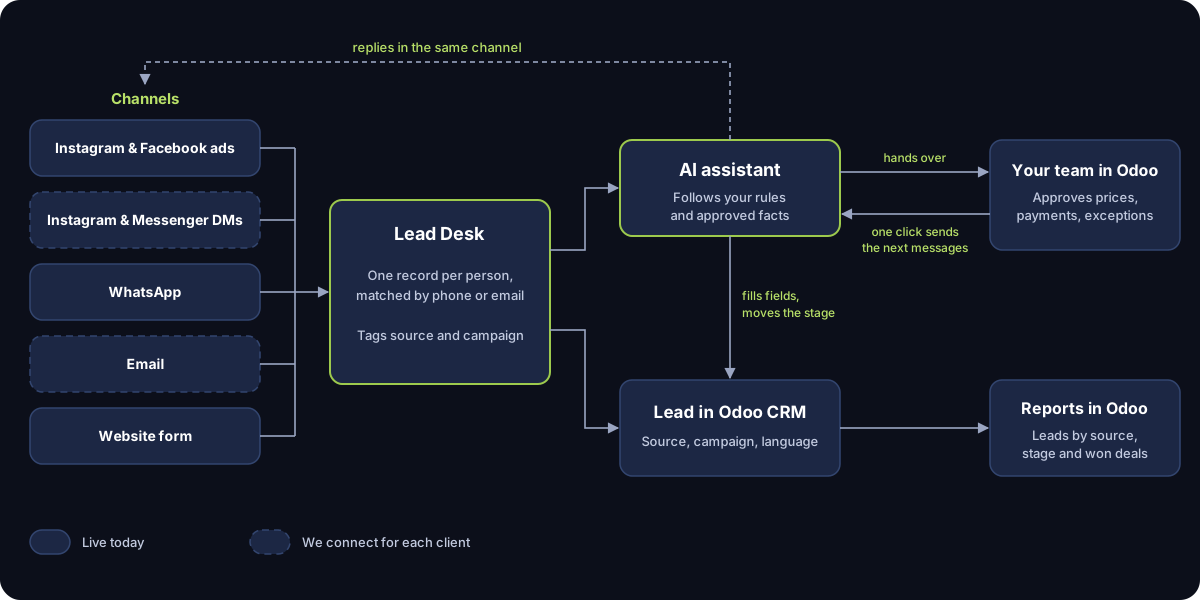
The same seven steps sit behind every build. What changes from one business to the next is the questions, the rules and who approves what.
Capture
Each connected channel sends new leads and messages to the desk. Ad and website sign-ups bring their campaign and form answers; WhatsApp brings the customer's first message.
One record
The desk matches each person by phone number or email, so a customer who signs up from an ad and then writes on WhatsApp is one lead, tagged in Odoo with its source, medium and campaign.
Reply within your rules
The assistant answers only from your rules file and the facts you approve: services, prices, opening hours, policies. It never makes up a price or an availability, and fields you mark confidential are never passed to the AI, so it cannot reveal them.
Qualify
It asks what your sales team would ask, such as dates, quantities, budget, location or the service needed, and writes each answer into the Odoo lead as the chat goes.
Hand over
Payments, discounts, complaints and anything outside the rules go to a person, with the whole conversation already on the lead. Your team acts in Odoo, and their click sends the next messages.
Follow up
Inside WhatsApp's 24-hour customer service window the assistant can reply freely; once it closes, only templates Meta has approved can go out. Customers who opt out are not messaged again.
Report
Odoo's CRM reports show your leads by source, medium and campaign, by stage, and the deals won.
See one built end to end: a travel agency
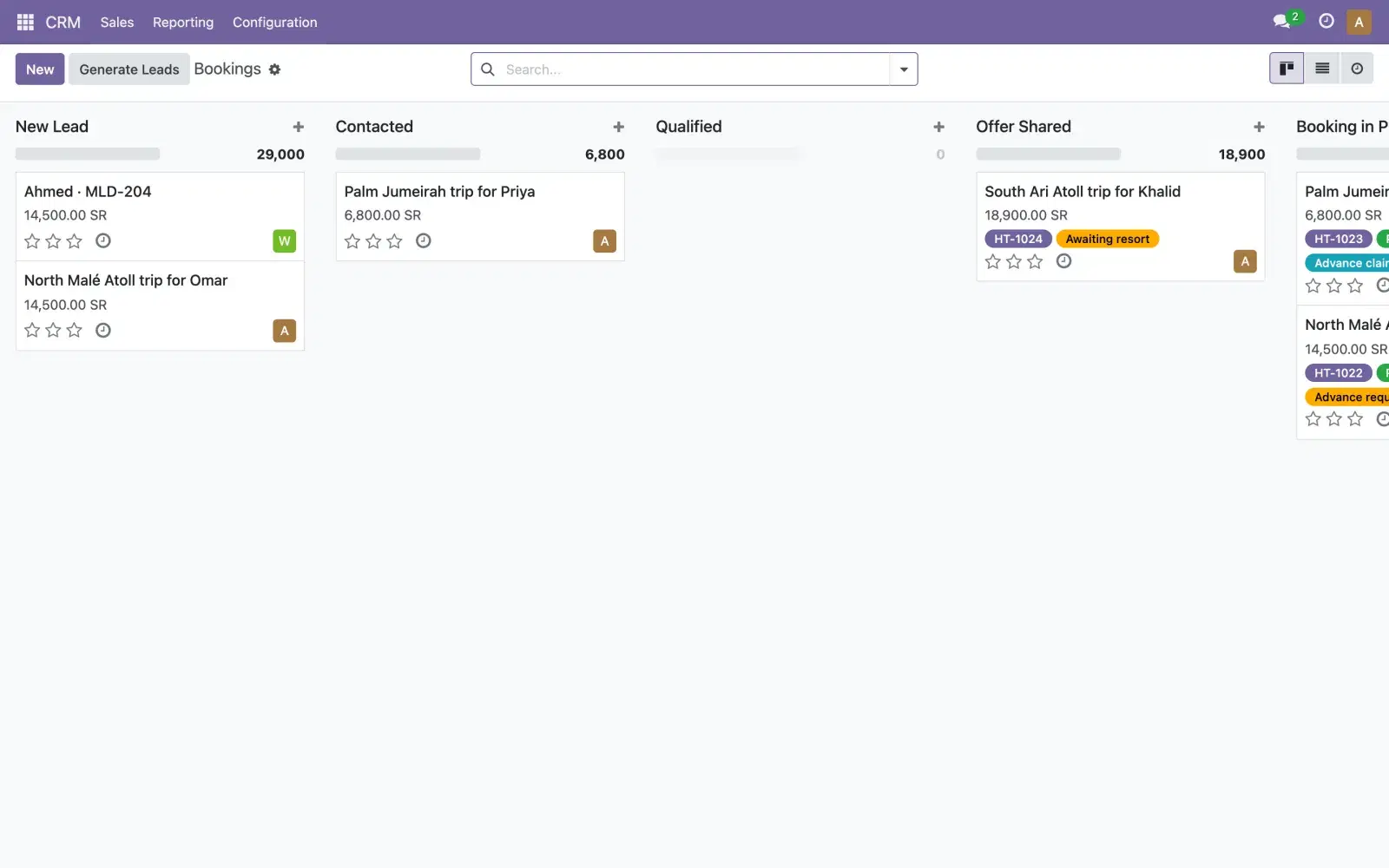
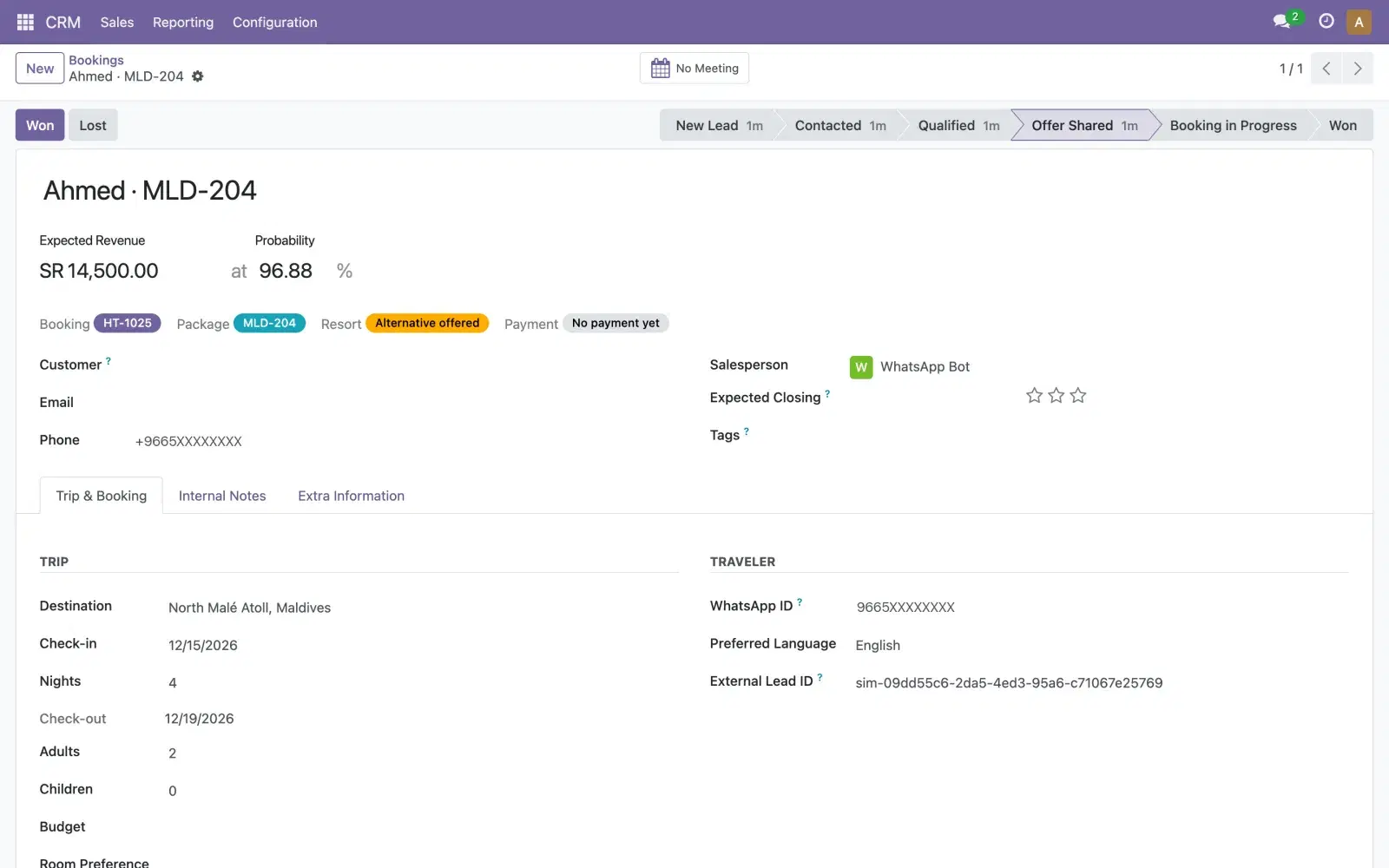
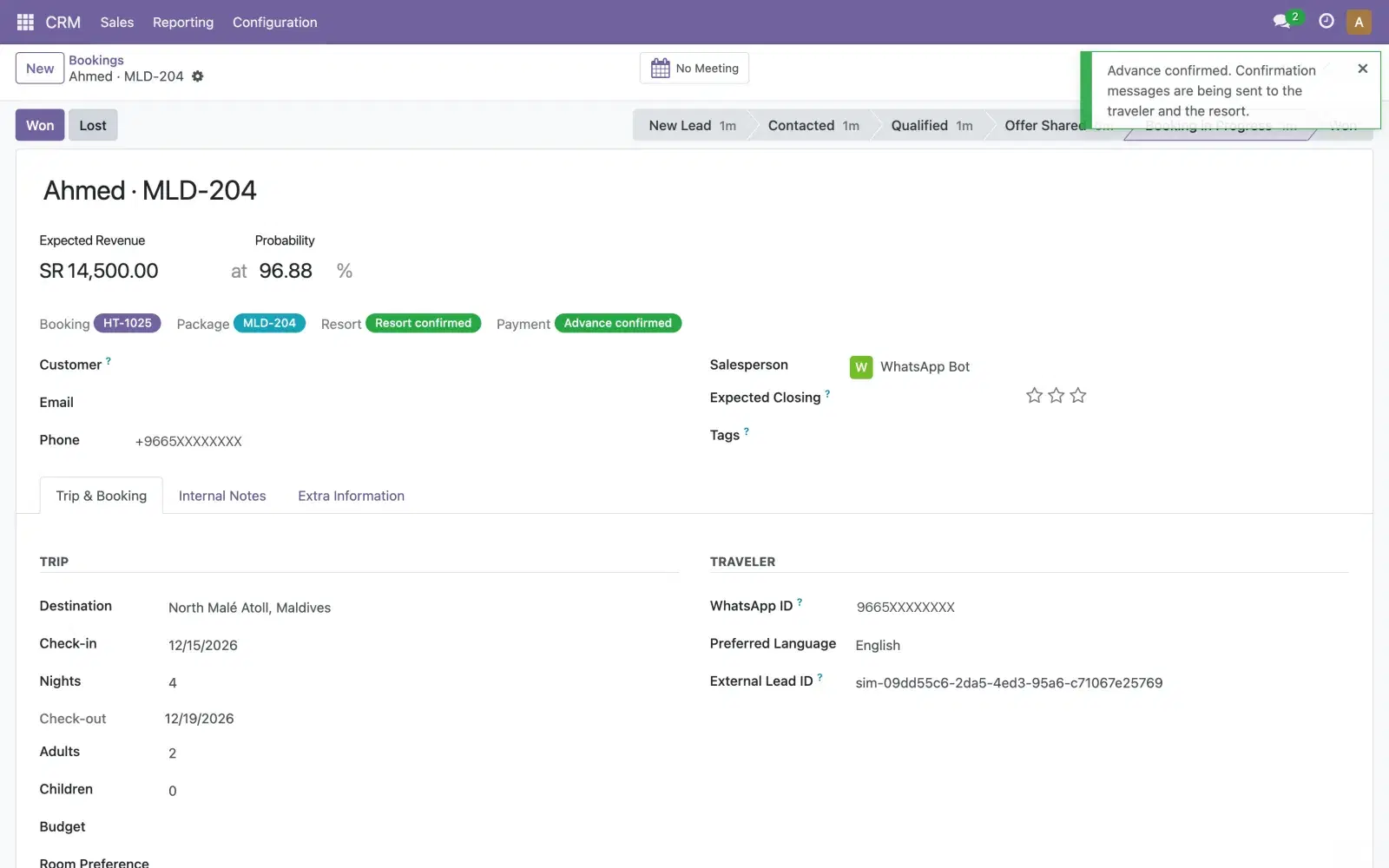
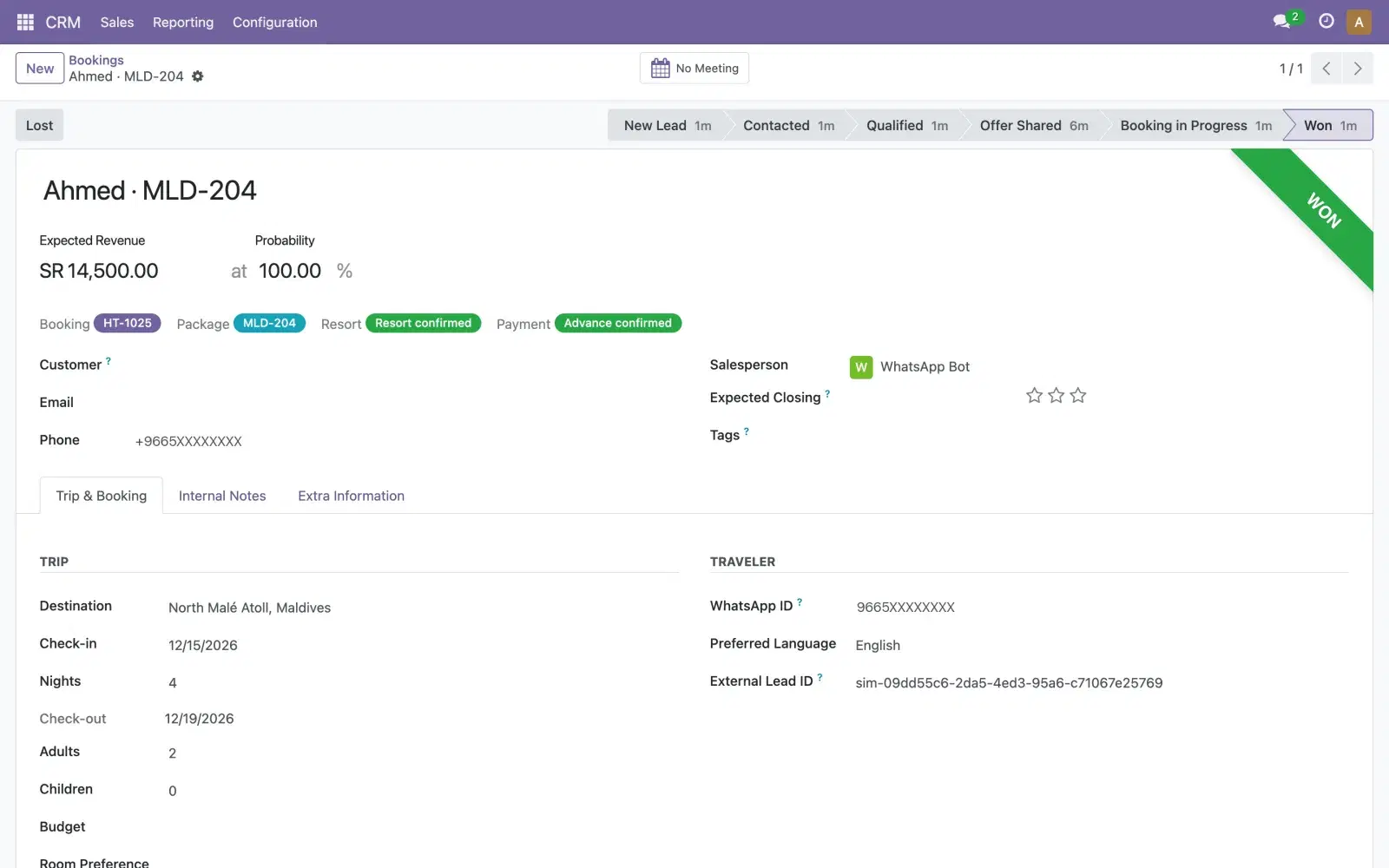
One example of the steps above, built as a demo for an invented travel agency: an ad sign-up becomes an Odoo lead, the assistant collects dates and guests on WhatsApp and keeps the resort's name private until the advance is paid, the resort confirms on WhatsApp with one tap, and the team confirms the payment in Odoo.
The same steps in other businesses
We have built the desk for a clinic, and as the travel demo above. For the other businesses below, this is how the same steps map to their work.
Clinics
Appointment requests from ads and WhatsApp.
- Asks: the service or doctor, the preferred day and time, new or returning patient
- A person handles: confirming the slot and any medical question
Travel agencies
Package codes in ads, supplier confirmation and advance payments.
- Asks: dates, number of travellers, the package code from the ad
- A person handles: confirming the advance payment; the supplier confirms on WhatsApp
Real estate
Viewing requests.
- Asks: area, budget, property type and when they can view
- A person handles: booking the viewing and any price negotiation
Training and education
Enrolment enquiries.
- Asks: the course, start date, level and who is paying
- A person handles: discounts and payment plans
Car rental
Booking requests.
- Asks: dates, pick-up city and car category
- A person handles: deposits, extra drivers and exceptions
Retail and e-commerce
Order questions.
- Asks: the order number or product, and the delivery city
- A person handles: refunds, exchanges and complaints
What is live today, and what we connect
Being clear about this matters more than a long feature list. The first list runs for clients today; the second we build and connect for each client, because each channel in it needs its own setup or Meta's approval.
Live today
- AI assistant on WhatsApp, on Meta's official Cloud API
- Your rules file, applied to every reply
- Odoo CRM: leads created, filled in and moved through stages, with the conversation on the lead
- Ad and website sign-ups that create the Odoo lead and start a WhatsApp chat
- Approvals in Odoo that send the next messages
- Supplier or partner confirmation on WhatsApp, with buttons
- Arabic, English, Hindi and Malayalam
- Meta-approved templates for follow-ups after the 24-hour window
- Dynamics 365 Business Central connector
We connect for each client
- Instagram Direct and Facebook Messenger (each needs Meta's App Review and a verified business)
- Facebook and Instagram Lead Ads, synced straight from Meta's lead webhook
- Email leads through an Odoo email alias, with AI-drafted replies on request
- A chat widget on your website, on request
Your data, your rules
The desk is built to keep control with you. Saudi Arabia's Personal Data Protection Law, overseen by SDAIA, and the UAE's Federal Decree-Law No. 45 of 2021, in force since 2 January 2022, both cover the personal data a lead desk handles: consent, the purpose it was collected for, how long it is kept, and what a customer may ask to see. We build the opt-in wording and retention into the desk; the legal sign-off stays with your team.
- Customer records stay in your own Odoo; the assistant reads only the fields it needs.
- Fields you mark confidential never reach the AI.
- The assistant says it is an AI assistant and offers a person.
- Every message is logged on the lead in Odoo.
- WhatsApp requires a customer's opt-in before a business messages them; we build it into your forms.
What We Deliver
How we deliver
- 01
Rules workshop and channel audit
We map where your leads come from today, the questions your best salesperson asks, what may be quoted and what must never be said, and who approves what. That becomes your rules file.
- Channel and lead-source map
- Your rules file, signed off by you
- Qualifying questions and hand-over points
- Lead fields and stages in Odoo
- 02
Build and connect channels to Odoo
We set up your WhatsApp Business Platform account, connect your sign-up forms and the channels you chose, and add the fields, stages and sources the desk fills in Odoo.
- WhatsApp number on the official Cloud API
- Sign-up forms connected to the desk
- Odoo CRM fields, stages and UTM sources
- Hand-over and approval buttons in Odoo
- 03
Test with real conversations and approve templates
Your team chats with the assistant the way customers do, in Arabic and English, and we tighten the rules until the answers are right. Follow-up templates go to Meta for approval.
- Test conversations reviewed with your team
- Rules adjusted from the test results
- Templates submitted to Meta
- Go-live checklist
- 04
Go live, measure, tune
We switch your channels over to the desk, follow the first conversations with you, and adjust the rules as new questions come in.
- The desk live on your channels
- Odoo reports by source and stage
- Rules updates from real conversations
Frequently asked questions
Yes, when Odoo runs on your own server: the desk connects through Odoo's external API, which Community and Enterprise both include there, and it works with Odoo.sh too. On Odoo Online, Odoo opens the external API only on its Custom plan, so the One App Free and Standard plans can't connect.
WhatsApp on Meta's official Cloud API, sign-up forms from your ads and website, and Odoo CRM, plus a Dynamics 365 Business Central connector. Instagram Direct, Facebook Messenger, Lead Ads synced straight from Meta, and AI replies to email are built for each client, because each needs its own setup or Meta's approval.
The window opens each time the customer messages or calls you, and inside it the assistant can reply freely. Once it closes, WhatsApp only lets you send templates Meta has approved, and Meta charges for each delivered template message. We write your follow-up templates in Arabic and English and submit them to Meta during the build.
It replies in Arabic, English, Hindi or Malayalam, in the language the customer writes in. We set its tone in your rules file and test it in Arabic with your team before go-live, and we don't promise a particular dialect until your team has tested it.
It never makes up a price, an availability or a policy, because it answers only from your rules and the facts you approve. It never sees fields you mark confidential, never confirms a payment (your team does that in Odoo), and never claims to be a person. Anything outside the rules goes to your team.
Your customer records stay in your Odoo, and your team sees each conversation on the lead there. Messages travel through Meta's WhatsApp Business Platform. The AI model that drafts replies receives the conversation and the facts you approved, never the fields you mark confidential, and the assistant reads only the Odoo fields it needs.
Yes. Payments, discounts, complaints and anything outside the rules are handed to a person, with the whole conversation already on the lead in Odoo. What your team does in Odoo, such as confirming a payment, sends the next messages to the customer.
Still have questions?
Our team is ready to help. Reach out and we'll get back to you as soon as possible.
Free offer
Free lead desk plan
Tell us where your leads come from today and what your team asks them. We'll send back a written plan: which channels to connect first, the questions and hand-over points for your rules file, and the Odoo fields and stages the desk needs.
All Services
Related Services
Related Articles
- Omnichannel Lead Management for Saudi Businesses: Instagram, WhatsApp, Facebook and Email in One Odoo CRM
- Instagram and Facebook Lead Ads into Odoo CRM, Followed Up on WhatsApp
- WhatsApp Business API and Odoo CRM: A Practical Integration Guide
- The WhatsApp 24-Hour Window and Message Templates, Explained for Saudi Businesses
- What an AI Sales Agent Can Safely Do on WhatsApp, and What Needs a Person